The media center in short
What Is Nuvio TV?
Nuvio TV is a free, open source media center app for Android phones and Android TV, made by NuvioMedia. Think of it as the front of house for your watching: it organises movies and shows with rich metadata, posters, backdrops, cast lists and ratings, keeps your library and watch progress in order, and plays streams through addons you add yourself.
That last part is the design in one sentence. Nuvio TV hosts no content of its own. You browse a beautiful catalogue, then the addons you have installed offer the streams for a title, in priority order. It is the same addon driven architecture that power users have loved for years, wrapped in an app that looks at home on a big TV and feels fast on a phone. No account is required to start, and the app is free.
This page is its download home: one verified universal file that works on phone and TV, an honest review, and guides written from real setups on real screens.
Inside the app
Nuvio TV Features
Every feature below is in the current build and was checked in our own testing on a phone and on Android TV.
- Rich browsing: movies and shows presented with posters, backdrops, cast, ratings and full metadata, so choosing what to watch feels like a cinema lobby, not a file list.
- An addon system for streams: add the addons and plugins you trust, use more than one, and let the app ask them in priority order when you press play.
- A proper built in player: subtitle styling, support for external subtitle files, intro and outro skip markers, and episode downloads for offline watching.
- Library and progress: a personal library, watch progress that survives between sessions, and a Continue Watching row that puts the next episode one tap away.
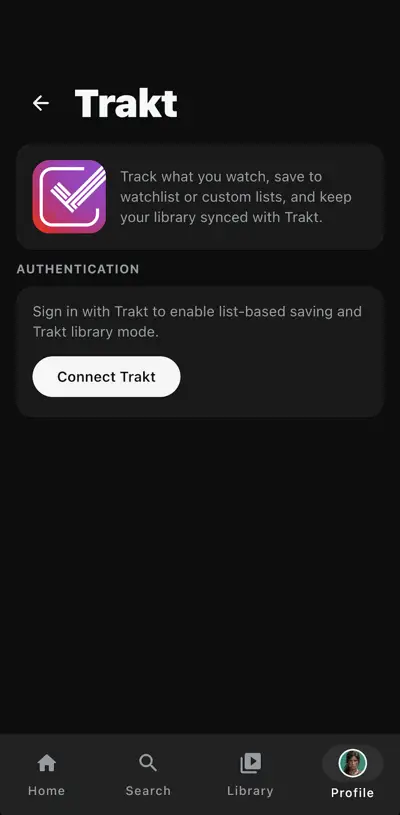
- Trakt and Simkl sync: connect either service to keep your watched history, watchlist and library in step across devices, with watchlist notifications.
- Two interfaces, one app: a touch first phone layout and a full Android TV layout built for the remote, with D-pad navigation across wide poster rails.
- Free and open source: Nuvio TV needs no account, no subscription, and source available under the GPL-3.0 licence for anyone who wants to look under the hood.
Plenty of players can open a stream. Nuvio TV is built to organise a whole watching life around that stream, on both screens you actually use.
From the real app
Nuvio TV Screenshots
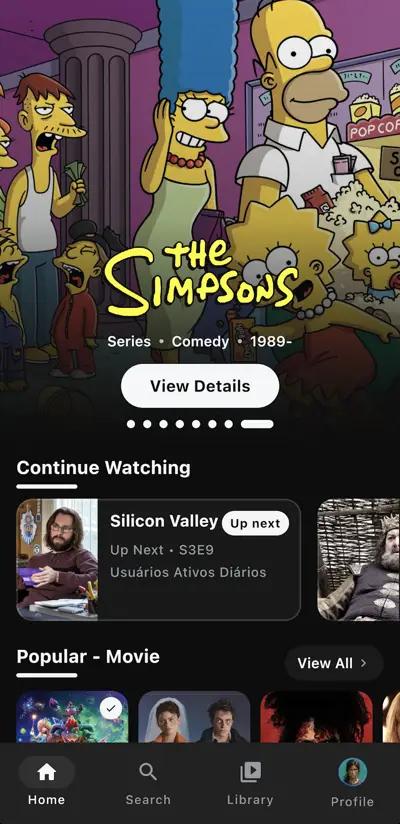
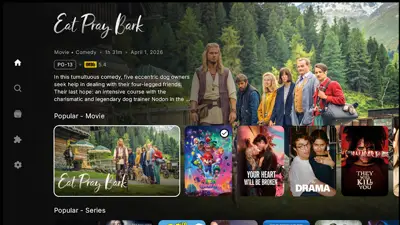
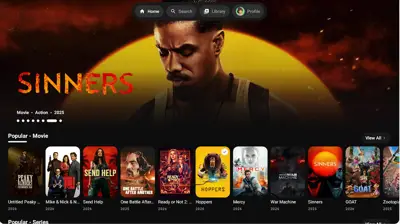
Every frame below is a real screenshot from the app: the phone home screen with its Continue Watching row, a title details page with Play and Save, the Trakt connection screen, and the Android TV interface with its wide poster rails and large backdrops. No renders, no mockups, just the app on real screens.


This build
What's New in This Build
For Nuvio TV, this build is the one our download serves, and it is a tidy statement of what the project has become: one universal file for phone and television, the addon system with priority ordering, the player with styled subtitles and skip markers, episode downloads, and sync with Trakt and Simkl.
Because the app is open source and actively developed, small refinements land regularly. This page treats file discipline seriously: the build here is re-tested on our phone and our TV whenever a new release is published, and our update guide shows how to install a new build over your current one without losing your library or progress.
Get it on phone and TV
How to Install Nuvio TV on Android
The Nuvio TV install is standard Android, and the same universal file serves both your phone and your Android TV.
- Free the space: the file is 222.8 MB and the app needs room beyond it for its library data and any episode downloads. Keep a gigabyte or more genuinely free.
- Download the file: tap the download button on this page and let the full file land, on Wi-Fi where you can. A partial file will not install.
- Allow the install: open the file, allow installs from your browser or file manager when Android asks, and tap Install.
- On a TV, use a file route you trust: open the file from your TV's file manager or send it from your phone, then install the same way. The app opens in its full TV layout automatically.
- Launch and browse first: open the app, look through the catalogue, then add your first addon when you are ready to play something.
If an install fails, it is nearly always storage or a short file: compare your download with the 222.8 MB in the details table, free real room, and fetch it again. The blog's install guide walks every screen on phone and TV.
How streams arrive
Addons, Explained Simply
Addons are small plugins that tell the app where streams for a title can be found. Nuvio TV ships as a clean, empty stage: the catalogue, the player and the library are the app's, and the streams arrive through addons you choose and install yourself.
You can run several addons at once in Nuvio TV. The app asks them in a priority order you control, so a fast, reliable addon can sit first and a specialist addon can back it up for older or rarer titles. Adding one is a short job from inside the app's settings, and removing one is just as quick, which keeps the experiment low risk.
Two honest notes. First, addon quality varies, because addons come from their own makers; our addon guide explains how to judge one before you trust it. Second, you are responsible for the addons you add and the sources they use. The app itself hosts nothing, and that separation is deliberate.
Watching, properly
The Player, Subtitles and Downloads
The built in player in Nuvio TV is where a media center earns its keep, and this one covers the details that matter on a long series run. Subtitles can be styled to your taste, size, colour and background, and you can load an external subtitle file when the built in options do not carry your language or the sync is off.
Intro and outro skip markers help a binge move at the right pace, without scrubbing through credits by thumb or by remote. Episodes can be downloaded inside the app, which turns a patchy connection or a flight into a non-event: queue the episodes on Wi-Fi, then watch them wherever.
On the TV, all of this in Nuvio TV is reachable from the remote, with the same settings you set on the phone. That consistency is rarer than it should be, and it is one of the reasons this app suits a two-screen household.
The big screen
Nuvio TV for Android TV
The TV interface is not the phone layout stretched wide. Nuvio TV for Android TV is a proper ten foot experience: large backdrops, wide poster rails you can sweep with the D-pad, a left hand navigation rail, and text sized for the sofa rather than the desk.
Focus is always visible, rows remember where you were, and Continue Watching sits near the top, so the nightly routine is remote down, press play, done. The same library, progress and addon setup you use on the phone carries to the television, and Trakt or Simkl sync keeps the two screens honest with each other.
If your household watches on both, this is the app's strongest argument: one file, one library, two screens, no second setup to maintain.
Checked before listing
Safety and Verification
We verify the Nuvio TV file like every file on this site: the package identity (com.nuvio.tv) and the 222.8 MB size are checked against the genuine build, permissions are audited, and the app is installed and used on our test phone and Android TV before the download button goes up. The build here is exactly the build this review describes.
One honest note belongs in this section. The app is a player and organiser; it hosts no movies or shows itself. Streams come from addons you add, and those addons are separate software from separate makers. Choose addons carefully, keep them updated, and use sources you have the right to use. Our safety guide in the blog walks through the checks in plain language.
File and requirements
Technical Details
The Nuvio TV download is a universal build, 222.8 MB, covering phones and Android TV in a single file, which is why it is larger than a phone-only app: both interfaces, the player and the artwork handling for big screens all travel together. It asks for Android 7.0 or newer, which covers the great majority of phones and televisions still in use.
The app is written in Kotlin with a modern Android stack and a dedicated media player at its core, and it shows in the small things: fast poster loading, smooth rail scrolling on modest TV hardware, and progress that is saved as you watch rather than when you remember to back out.
Storage beyond the install depends on you: a browsed library is light, while downloaded episodes take the space their quality suggests. The downloads guide in the blog covers managing that space sensibly.
Earlier builds
Old Versions
Earlier builds of Nuvio TV circulate in a few places, and they are best treated as history. Addon support, player behaviour and sync all improve between releases, and an old build is the most common cause of the odd, hard to reproduce problems readers write to us about.
The file on this page is the current build, refreshed and re-tested as new releases arrive. If a guide somewhere describes a menu you cannot find, check your build against the details table on this page before assuming the guide is wrong; half the time, the version is.
Other ways to watch
Nuvio TV Alternatives
The neighbouring options split into camps. Simple video players open files and streams well, but leave browsing, library and progress to you. Closed streaming apps look polished, but the catalogue and sources are theirs, not yours, and the subscription meter is always running.
Nuvio TV sits in a more interesting place: a polished, poster-led catalogue and library that you control, an addon system that lets you choose your sources, sync with the tracking services many viewers already use, and a price of zero with the source open for inspection. Viewers who want that combination, on phone and TV alike, usually stop looking once they find it.
When something breaks
Troubleshooting
The install fails or the file will not open. Size first: anything short of the full 222.8 MB is a broken download. Then storage: free room well beyond the file size, and install again from Wi-Fi.
A title has no streams in Nuvio TV. That is an addon matter, not a player fault. Check the addon is installed and enabled, try a second addon for that title, and confirm your connection is up.
Nuvio TV buffers or stutters. Try a different stream from the list, prefer a lower resolution on a busy network, and on TV prefer a wired connection where the router allows it.
Subtitles are out of sync or missing. Load an external subtitle file from the player, adjust styling for readability, and check the episode's own subtitle options before assuming none exist.
Our common problems guide in the blog keeps the longer list, in fix order.
Staying current
How to Update Nuvio TV
Updating Nuvio TV keeps addon support and the player current, and the method protects your setup. Download the current Nuvio TV file from this page and install it directly over your existing copy, never uninstalling first, and your library, progress and addon setup carry across.
After an update, give the app one normal session before judging it: poster caches refresh and first runs are never the representative ones. Then check the addons screen, because that is where useful changes like to appear, and confirm your sync still shows connected if you use Trakt or Simkl.